Responses and transcripts
A response contains the evidence from one participant’s conversation with hollie. Review it when exact wording, tone, or context matters.
Open the source
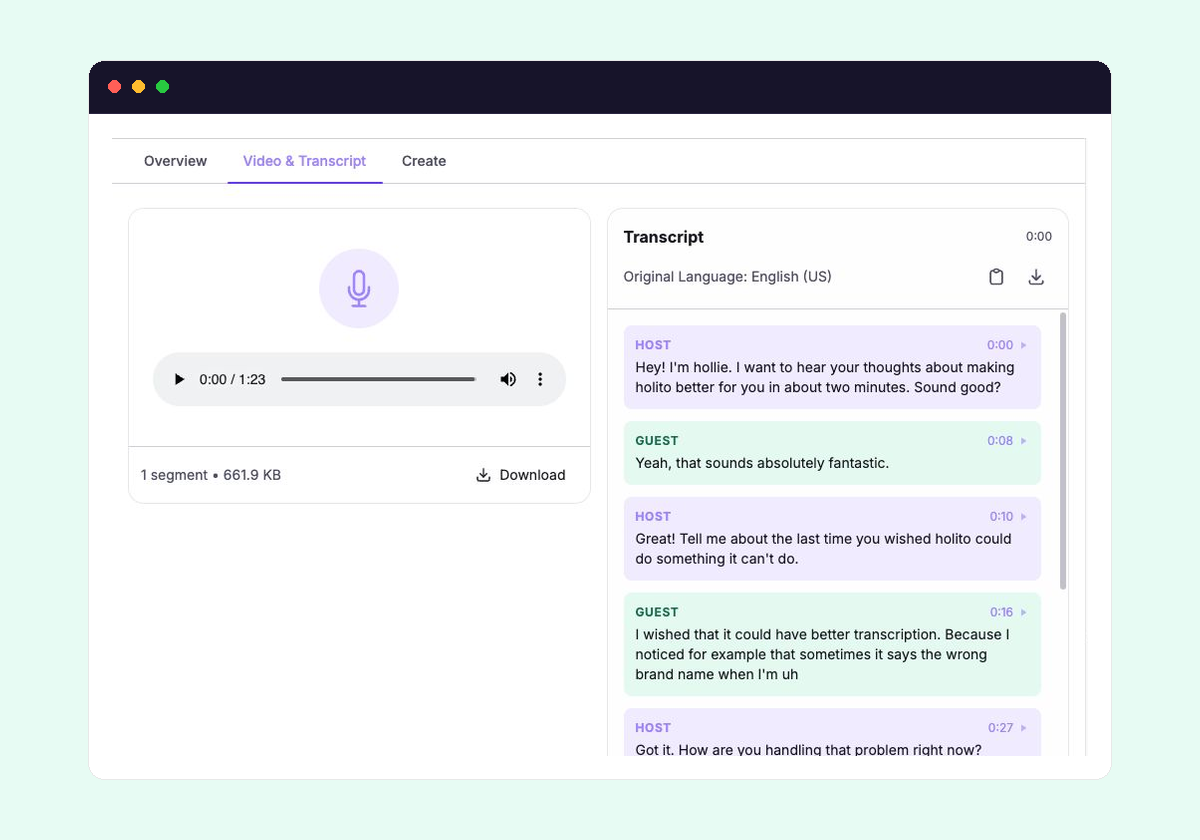
Open a conversation and select a participant from the response selector. A completed response opens on Overview, where its generated report appears. The original evidence is under Audio & Transcript or Video & Transcript, depending on how the conversation was recorded.
Response and invitation states are explained separately in Participants and invitation status.
Follow the conversation
The transcript separates hollie’s turns as Host and the participant’s turns as Guest. Use the surrounding turns to understand what prompted an answer and whether a shorter quote keeps its original meaning.
When a recording is available, selecting a transcript turn moves playback to that part of the conversation. Playback also follows the active transcript turn. If the recording has several segments, choose the relevant segment before using Download.
Trace quotes back to evidence
The individual report on Overview surfaces Key Quotes and other findings. Select a quote or a point in the sentiment journey to open its supporting transcript moment.
Ask hollie citations can also take you to the response and turn they support. Read the surrounding exchange before publishing a quote or treating it as evidence for a broader claim.
Reuse the transcript
You can copy the visible transcript or download it as a text file. If Translate is available, holito keeps the original transcript and lets you switch between the original and translated versions. Check names, specialist terms, and important claims against the recording before using a translation externally.
The report remains on Overview. Content created from this response appears under Create.
Evidence that is still processing
A response can appear before all of its results are ready. The report requires a completed conversation, and a recording may take longer to process than the transcript. Return after processing finishes if the transcript is available but the recording is not yet playable.
Next, learn how to interpret Generated reports or follow the complete response review workflow.