Information block
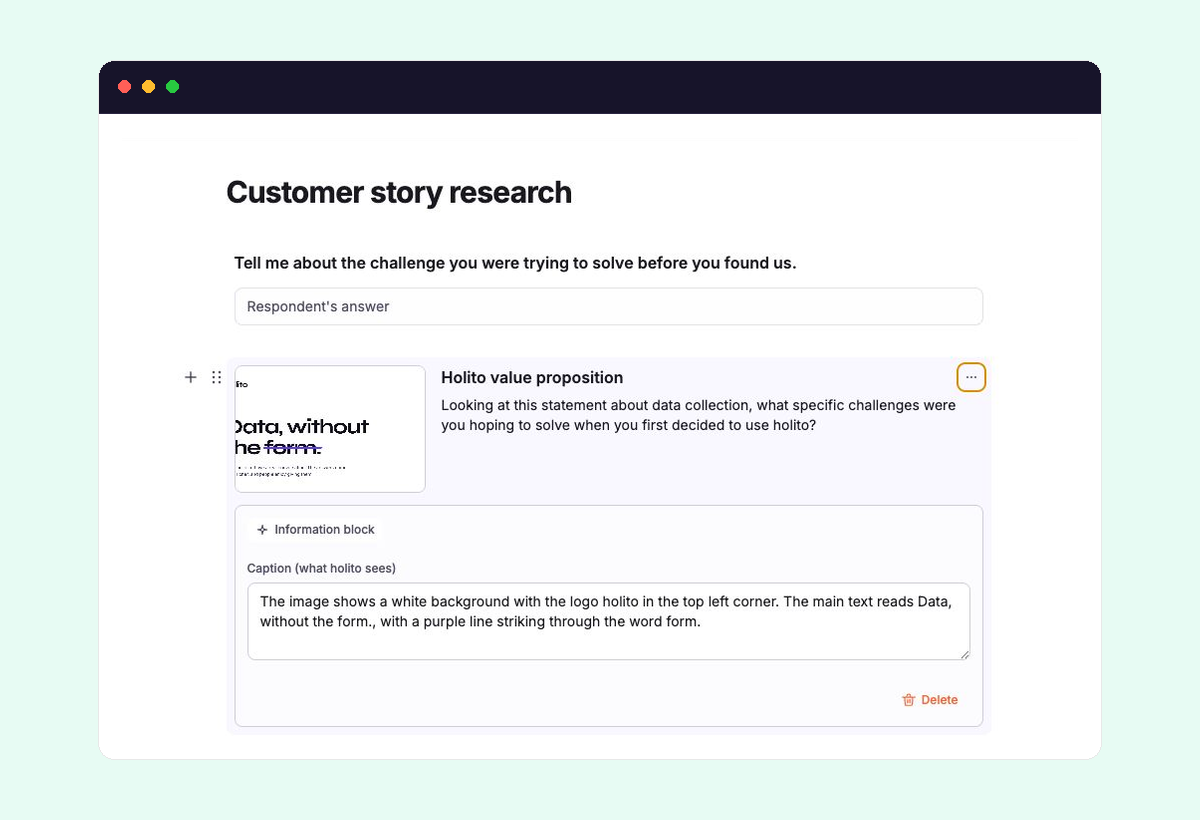
An Information block adds visual context to a conversation. It can show a screenshot, concept, chart, design, or other image before hollie asks the participant to respond to it.
Prepare the image
Use a clear image with one obvious subject. Participants can enlarge it, but important labels should still be readable on a typical laptop or phone.
Information blocks accept PNG, JPEG, and WEBP images up to 15 MB. SVG files are not supported.
Set how hollie should use it
Add an Information block from Add field, then add the image. holito creates a caption and can suggest a title and directive.
Each part has a different job:
- Title identifies the image for the participant. It is optional.
- The directive tells hollie what response to invite, such as a first reaction, comparison, interpretation, or usability observation.
- Caption (what holito sees) describes the image to hollie. Review it in the block’s settings when exact visual details matter.
Write the directive around the evidence you need. “What is your first reaction to this pricing page?” is more useful than “What do you think?” because it anchors the response without leading it.
During the conversation
When the conversation reaches the block, the image appears beside hollie and the participant can enlarge it. hollie uses the caption to understand the visual, then uses the directive to continue the conversation.
hollie does not interpret the displayed image directly. Correct a vague or inaccurate caption before using the conversation with participants.
Give the block one visual and one discussion purpose, and place it immediately before the topic that depends on it. Split dense comparisons when participants would otherwise need to remember too much at once.
Replace a problem image
If the image is rejected, use a supported format below the size limit. If the editor shows couldn’t load preview, select Replace.
If holito cannot generate the supporting suggestions, select Retry. Review the resulting caption before continuing.
See Conversation builder to position the block within the wider flow.