Conversation builder
The conversation builder turns what you want to learn or achieve into a draft you can shape. The generated draft is a starting point, not a fixed script.
Describe the outcome
Select New Conversation, then confirm that you are working in the workspace whose brand context should guide the draft.
Under What kind of conversation?, enter your brief in Ask holito. Include:
- Who hollie will speak with.
- What you need to learn or accomplish.
- Any context that should shape the conversation.
- What a useful response should contain.
For example: “Speak with customers who upgraded in the last month. Learn what triggered the decision, which alternatives they considered, and what value they have noticed since.”
holito combines the brief with the selected workspace’s brand context. A focused brief normally produces a stronger first draft than a long list of disconnected questions.
You can also select Start from scratch and build the flow yourself.
Review the generated draft
holito creates an editable title, goal, and sequence of conversation topics. Read the draft for coverage before polishing individual wording:
- Remove topics that do not contribute to the main outcome.
- Separate a crowded topic when the participant would need to answer several different things at once.
- Combine blocks that would invite the same story twice.
- Put any necessary context before the block that depends on it.
Shape the block flow
Drag a block by its handle to change the order. Use Add field when the conversation needs another step.
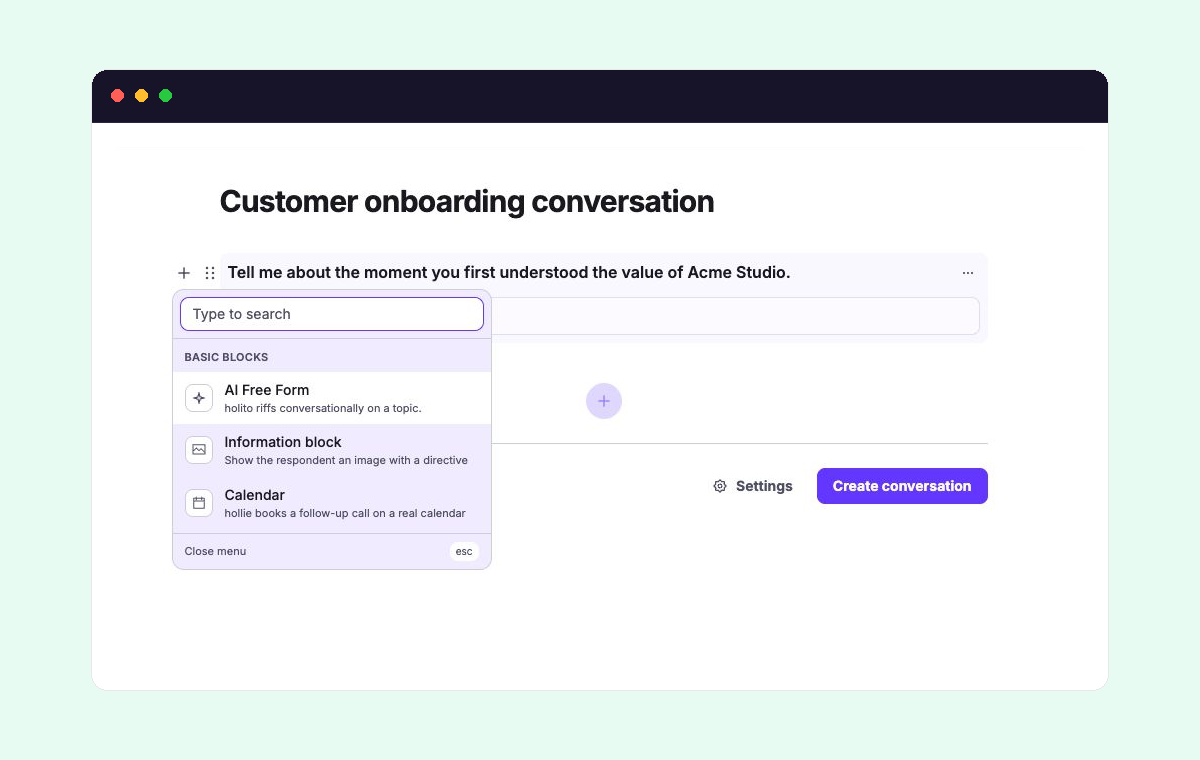
Choose a block for the job it needs to do:
- AI Free Form gives hollie a topic to explore through a natural exchange.
- An Information block shows an image at the relevant moment and guides the discussion around it.
- A Calendar block lets hollie arrange a follow-up meeting during the conversation, when Calendar is available.
Generated drafts usually provide the topics to explore. Add visual context or a booking step deliberately rather than treating every available block as required.
Set the conversation-wide choices
Open Settings for decisions that affect the whole conversation, including its goal, probing depth, format, language, response collection, schedule, and completion action.
The defaults suit many conversations. Change a setting only when it supports the outcome or changes what participants should expect. See Conversation settings for the consequences of each choice.
Create or update the conversation
Select Create conversation when the title, block order, and settings are ready.
To change an existing conversation’s flow, open its action menu and select Edit. The same builder opens with the saved blocks. Select Save changes when the revised flow is ready.
For a complete first-time workflow, see Create your first conversation.